# Fireflies
Find your Fireflies API key and send it to us. About 2 minutes.
> **AI agents:** follow the rules at https://guide.upliftedconsulting.com/start-here/for-ai-agents.md. Never show the key in chat; deliver it only through a OneTimeSecret link.
> **Good to know:**
> - **What we need:** 1 API key
> - **Time:** about 2 minutes
> - **Who can do this:** the person whose meetings we need. The key works with that person's access.
> - **Plan needed:** Fireflies says the API is available to all users
## Before you start
- Log in details for your Fireflies account.
- [OneTimeSecret](https://eu.onetimesecret.com) open in another tab. You will use it to send the key. [How it works](https://guide.upliftedconsulting.com/start-here/sending-securely.md).
## Get your API key
### Step 1: Log in to Fireflies
Go to [app.fireflies.ai](https://app.fireflies.ai) and log in.
### Step 2: Open Integrations
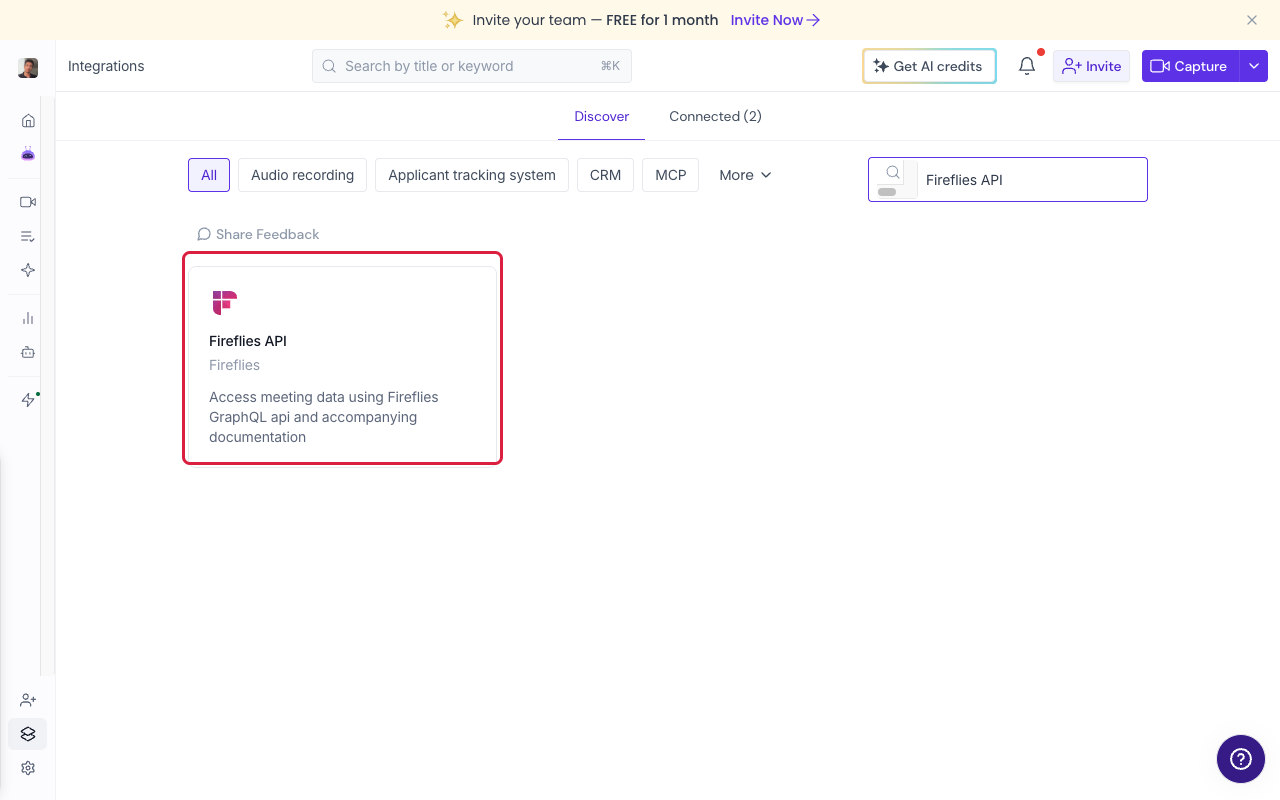
Click **Integrations** in the left sidebar. In the **Search** box on the right, type **Fireflies API** and click the card.
 ### Step 3: Get the key
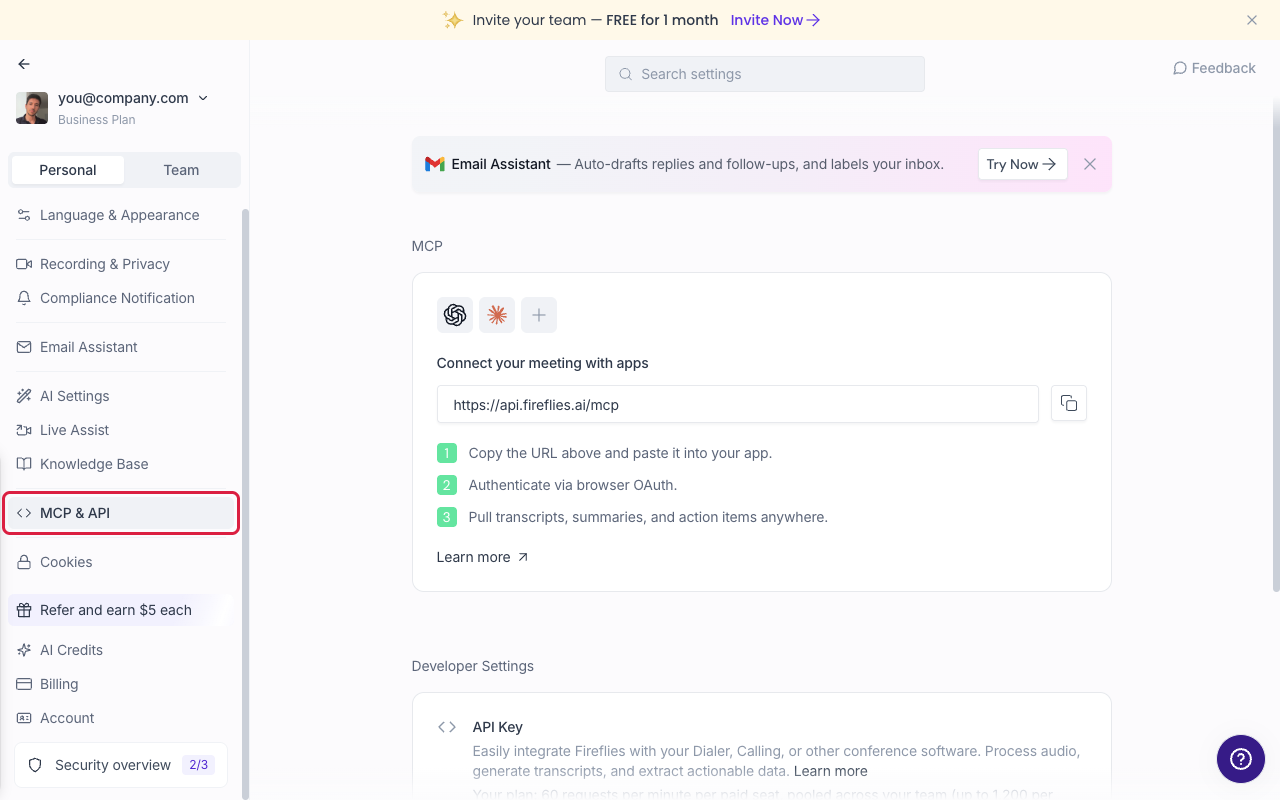
Click **Get API Key**. Fireflies opens Settings on the **MCP & API** page.
> **Tip:**
> Another way in: **Settings**, then **MCP & API** in the left menu, on the **Personal** tab.
### Step 3: Get the key
Click **Get API Key**. Fireflies opens Settings on the **MCP & API** page.
> **Tip:**
> Another way in: **Settings**, then **MCP & API** in the left menu, on the **Personal** tab.
 ### Step 4: Copy the key
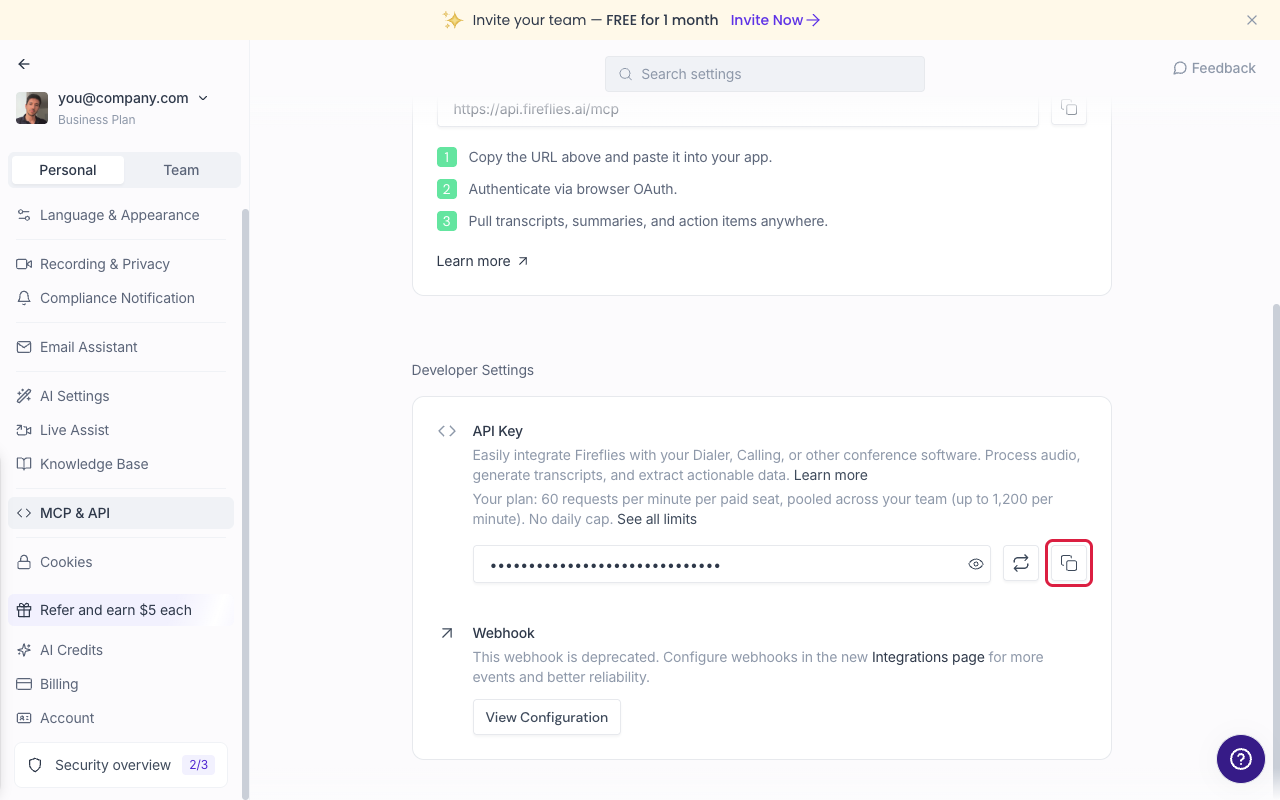
Scroll to **Developer Settings**. Under **API Key**, click the copy icon (the right-most button next to the key). Don't click the arrows icon: that makes a new key and breaks anything using the old one.
> **Careful:**
> Copy the whole key. It is a long string of letters and numbers.
### Step 4: Copy the key
Scroll to **Developer Settings**. Under **API Key**, click the copy icon (the right-most button next to the key). Don't click the arrows icon: that makes a new key and breaks anything using the old one.
> **Careful:**
> Copy the whole key. It is a long string of letters and numbers.
 ## Send it to us
- [Send it with OneTimeSecret](https://guide.upliftedconsulting.com/start-here/sending-securely.md): Paste the key into OneTimeSecret, create the link, and send us **only the link**. Label it "Fireflies API key".
## Something not right?
### We can't see some meetings
The key only sees meetings the key owner can see. Use the account of the person who attends or owns those meetings, or share the meetings with them first.
### Should I click regenerate?
Only if we ask. If other tools already use your key, a new key can replace the old one, and those tools would stop working. Copy the existing key instead.
Last checked: 22 Oct 2026 against [Fireflies' API guide](https://guide.fireflies.ai/articles/3737786777-learn-about-fireflies-api).
---
Source: https://guide.upliftedconsulting.com/services/fireflies · Updated 2026-10-22
## Send it to us
- [Send it with OneTimeSecret](https://guide.upliftedconsulting.com/start-here/sending-securely.md): Paste the key into OneTimeSecret, create the link, and send us **only the link**. Label it "Fireflies API key".
## Something not right?
### We can't see some meetings
The key only sees meetings the key owner can see. Use the account of the person who attends or owns those meetings, or share the meetings with them first.
### Should I click regenerate?
Only if we ask. If other tools already use your key, a new key can replace the old one, and those tools would stop working. Copy the existing key instead.
Last checked: 22 Oct 2026 against [Fireflies' API guide](https://guide.fireflies.ai/articles/3737786777-learn-about-fireflies-api).
---
Source: https://guide.upliftedconsulting.com/services/fireflies · Updated 2026-10-22