# LeadMagic
Create a LeadMagic API key and send it to us. About 2 minutes.
> **AI agents:** follow the rules at https://guide.upliftedconsulting.com/start-here/for-ai-agents.md. Never show the key in chat; deliver it only through a OneTimeSecret link.
> **Good to know:**
> - **What we need:** 1 API key
> - **Time:** about 2 minutes
> - **Who can do this:** the account owner or an admin of the workspace
> - **Plan needed:** a paid LeadMagic plan. Without one, LeadMagic shows "Almost there" and asks you to pick a plan before you can create a key. Each lookup we run uses your credits.
## Before you start
- Log in details for your LeadMagic account.
- [OneTimeSecret](https://eu.onetimesecret.com) open in another tab. You will use it to send the key. [How it works](https://guide.upliftedconsulting.com/start-here/sending-securely.md).
## Get your API key
### Step 1: Log in to LeadMagic
Go to [app.leadmagic.io](https://app.leadmagic.io) and log in.
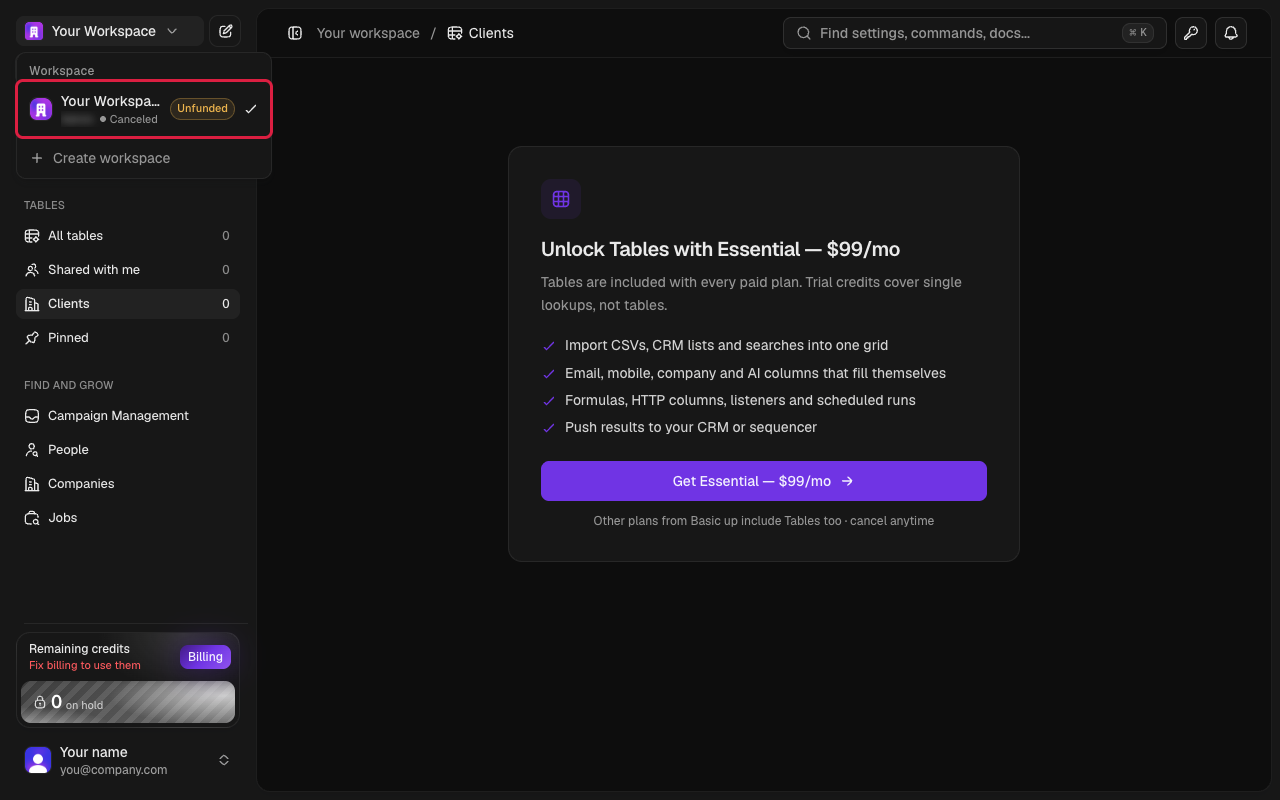
### Step 2: Check the workspace
Look at the workspace name in the sidebar. Make sure it is the workspace we will work in. Switch if needed.
 ### Step 3: Open API Keys
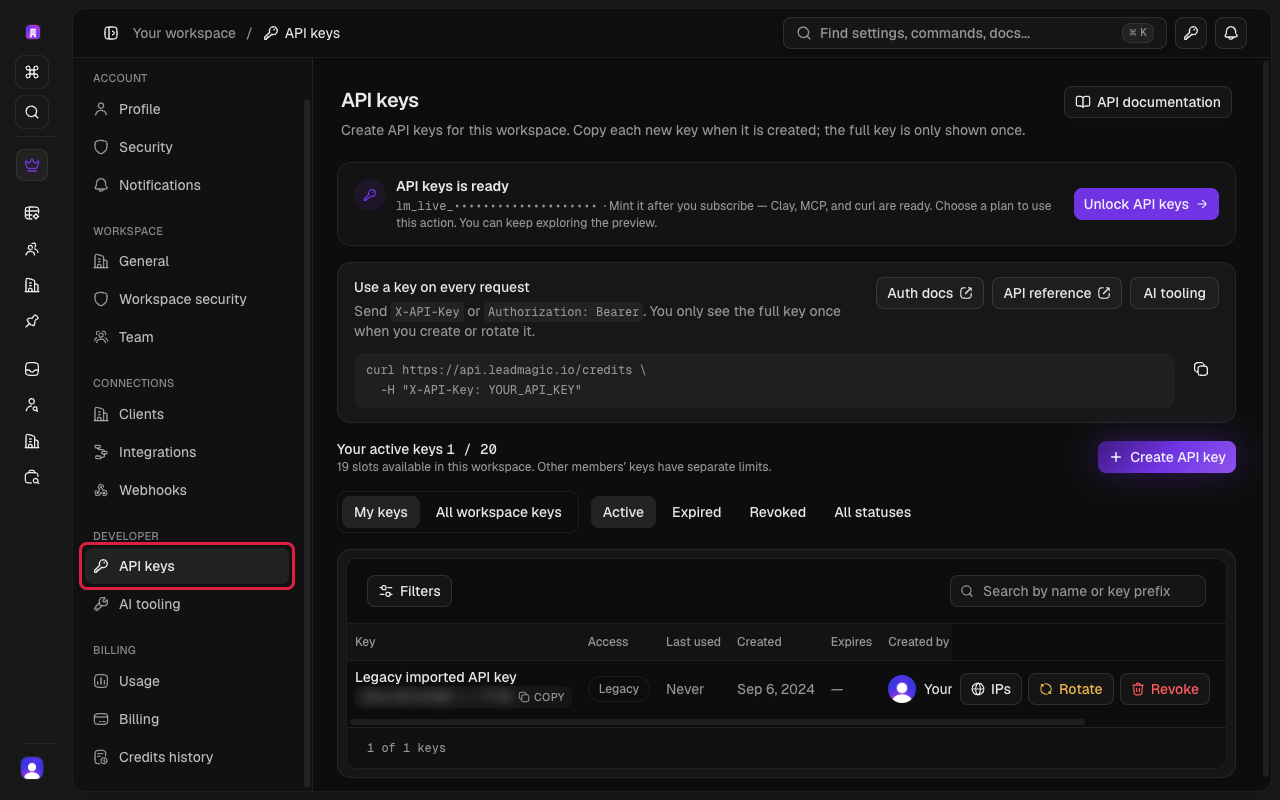
Click the key icon at the top right, or go to **Settings** and click **API keys** (under **Developer**).
### Step 3: Open API Keys
Click the key icon at the top right, or go to **Settings** and click **API keys** (under **Developer**).
 ### Step 4: Create a key
Click **Create API key** (above the list of keys). Type a name, for example "Uplifted Consulting".
### Step 5: Copy the key
Copy the key straight away.
> **Careful:**
> LeadMagic shows the full key **only once**. If you close the window before copying it, you will need to make a new key.
## Send it to us
- [Send it with OneTimeSecret](https://guide.upliftedconsulting.com/start-here/sending-securely.md): Paste the key into OneTimeSecret, create the link, and send us **only the link**. Label it "LeadMagic API key".
## Something not right?
### I don't see API Keys in Settings
You are probably logged in as a team member without admin rights. Ask the account owner to do these steps, or to give you admin access.
### I made the key in the wrong workspace
Keys belong to one workspace. Switch to the right workspace and create a new key there.
### Should I revoke my old key?
No. Clicking **Revoke** stops a key instantly. Any tool using it would stop working. Leave existing keys alone and just create a new one for us.
Last checked: 22 Oct 2026 against [LeadMagic's API keys help article](https://leadmagic.io/help/account-management/api-keys).
---
Source: https://guide.upliftedconsulting.com/services/leadmagic · Updated 2026-10-22
### Step 4: Create a key
Click **Create API key** (above the list of keys). Type a name, for example "Uplifted Consulting".
### Step 5: Copy the key
Copy the key straight away.
> **Careful:**
> LeadMagic shows the full key **only once**. If you close the window before copying it, you will need to make a new key.
## Send it to us
- [Send it with OneTimeSecret](https://guide.upliftedconsulting.com/start-here/sending-securely.md): Paste the key into OneTimeSecret, create the link, and send us **only the link**. Label it "LeadMagic API key".
## Something not right?
### I don't see API Keys in Settings
You are probably logged in as a team member without admin rights. Ask the account owner to do these steps, or to give you admin access.
### I made the key in the wrong workspace
Keys belong to one workspace. Switch to the right workspace and create a new key there.
### Should I revoke my old key?
No. Clicking **Revoke** stops a key instantly. Any tool using it would stop working. Leave existing keys alone and just create a new one for us.
Last checked: 22 Oct 2026 against [LeadMagic's API keys help article](https://leadmagic.io/help/account-management/api-keys).
---
Source: https://guide.upliftedconsulting.com/services/leadmagic · Updated 2026-10-22