# OpenRouter
Create an OpenRouter API key with a spending cap and send it to us. About 5 minutes.
> **AI agents:** follow the rules at https://guide.upliftedconsulting.com/start-here/for-ai-agents.md. Never show the key in chat; deliver it only through a OneTimeSecret link.
## Inputs from Uplifted Consulting needed before starting
If the client doesn't have these, stop this tool and mark it blocked (optional items have a default).
- Suggested credit limit (optional)
> **Good to know:**
> - **What we need:** 1 API key, with a credit limit
> - **Time:** about 5 minutes
> - **Who can do this:** the account owner
> - **Plan needed:** no plan. You pay as you go with prepaid credits.
## Before you start
- Log in details for [openrouter.ai](https://openrouter.ai).
- A payment card, if your account has no credits yet.
- [OneTimeSecret](https://eu.onetimesecret.com) open in another tab. You will use it to send the key. [How it works](https://guide.upliftedconsulting.com/start-here/sending-securely.md).
## Step 1: Add credits (skip if you already have some)
### Step 1: Open Credits
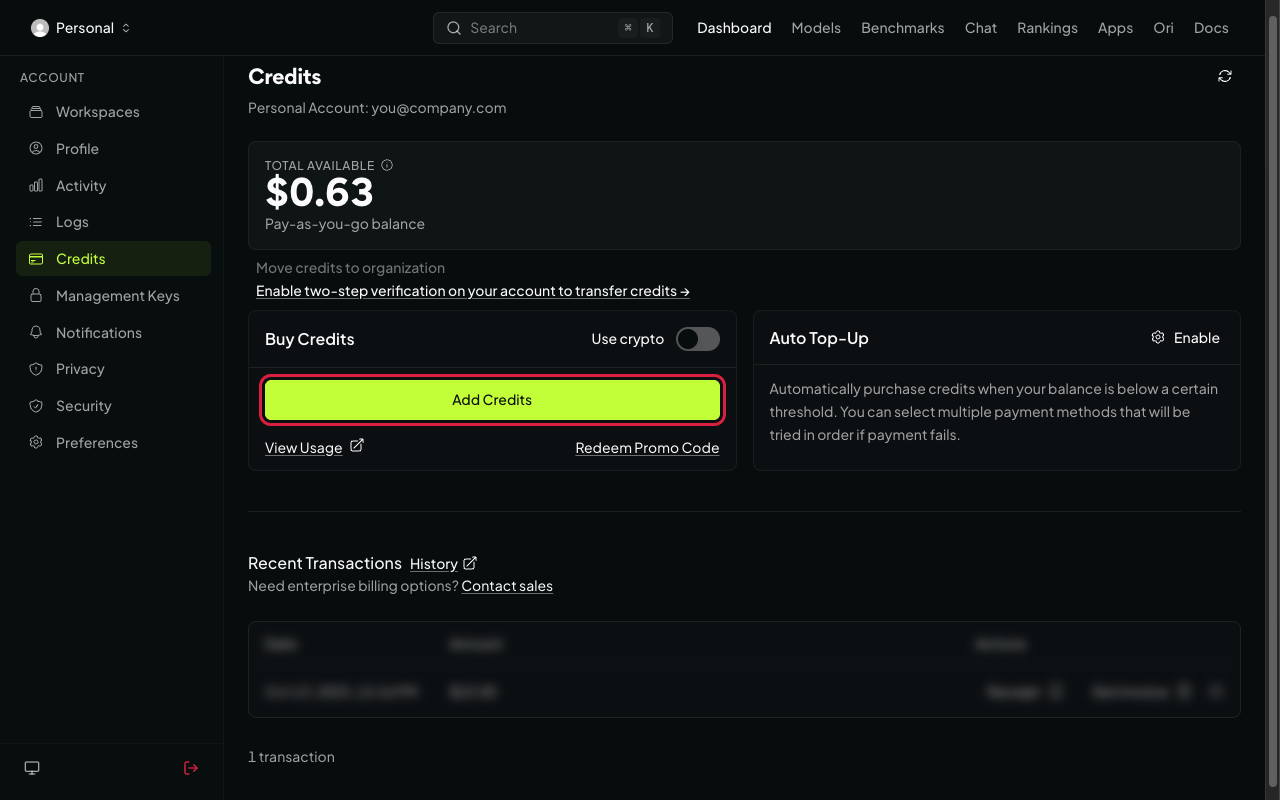
Log in and go to [openrouter.ai/settings/credits](https://openrouter.ai/settings/credits).
 ### Step 2: Add credits
Add the amount we agreed and pay. A small card fee applies.
## Step 2: Create the API key
### Step 1: Open API keys
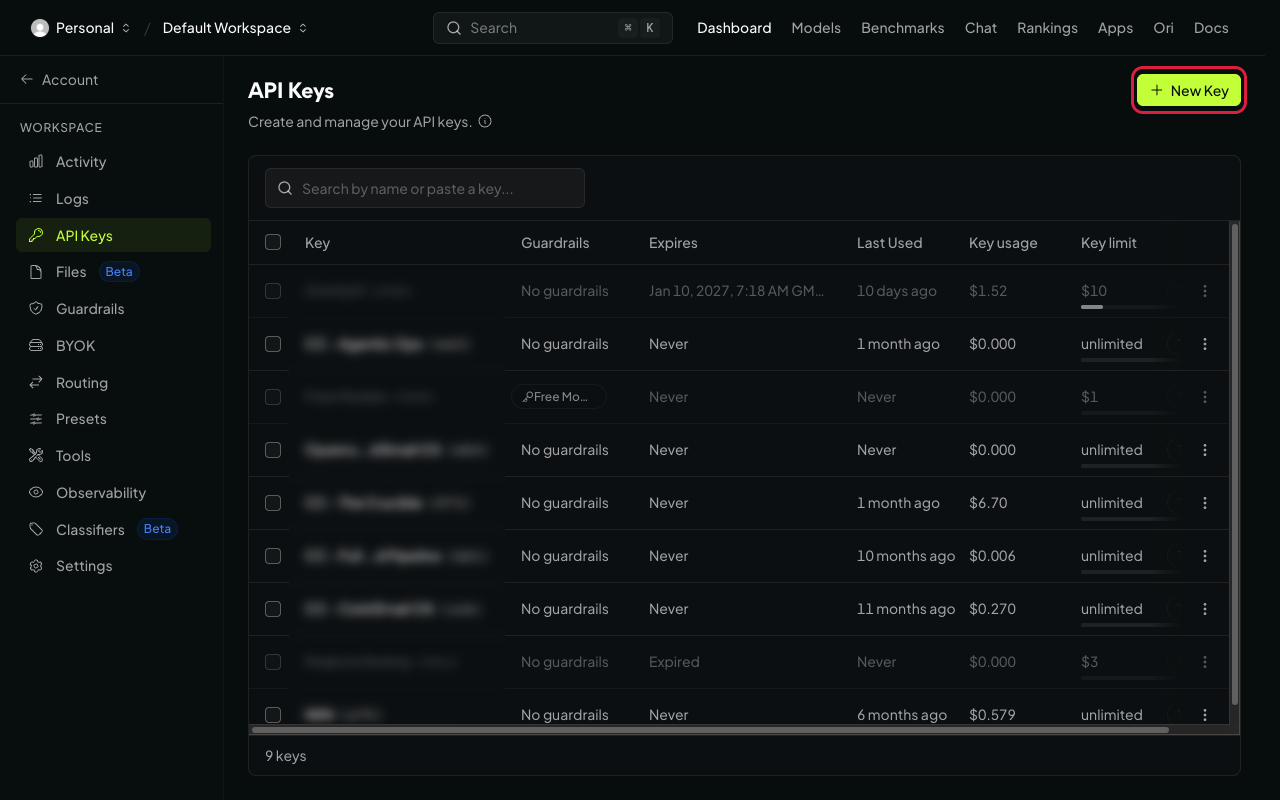
Go to [openrouter.ai/settings/keys](https://openrouter.ai/settings/keys). Click **New Key** (top right).
### Step 2: Add credits
Add the amount we agreed and pay. A small card fee applies.
## Step 2: Create the API key
### Step 1: Open API keys
Go to [openrouter.ai/settings/keys](https://openrouter.ai/settings/keys). Click **New Key** (top right).
 ### Step 2: Name it and set a limit
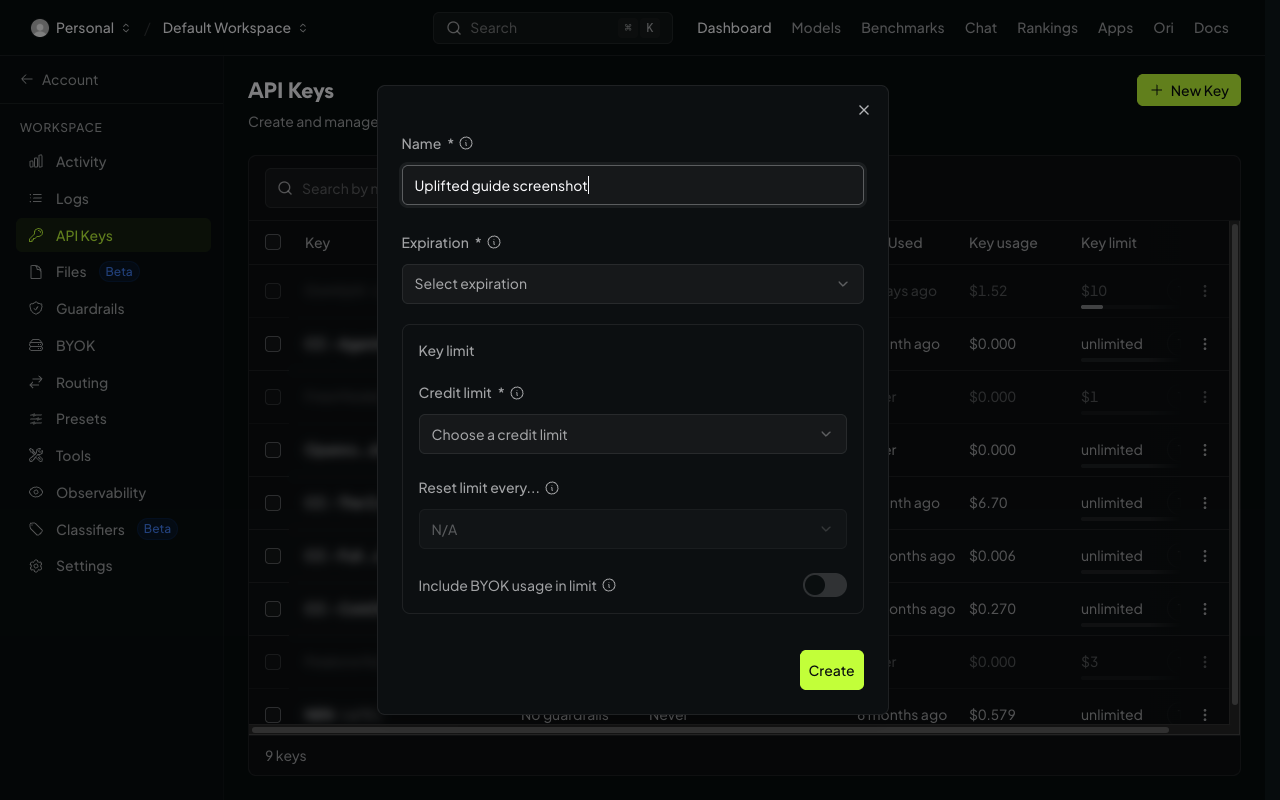
- **Name:** "Uplifted Consulting".
- **Expiration:** choose **No expiration**, unless we agreed an end date.
- **Credit limit:** the amount we agreed ($50, $250, $1,000 or **Custom amount**). This caps what the key can spend.
- **Reset limit every...:** choose **Monthly** if you want the limit to refill each month. Leave it as it is for a one-time cap.
Click **Create**.
### Step 2: Name it and set a limit
- **Name:** "Uplifted Consulting".
- **Expiration:** choose **No expiration**, unless we agreed an end date.
- **Credit limit:** the amount we agreed ($50, $250, $1,000 or **Custom amount**). This caps what the key can spend.
- **Reset limit every...:** choose **Monthly** if you want the limit to refill each month. Leave it as it is for a one-time cap.
Click **Create**.
 ### Step 3: Copy the key
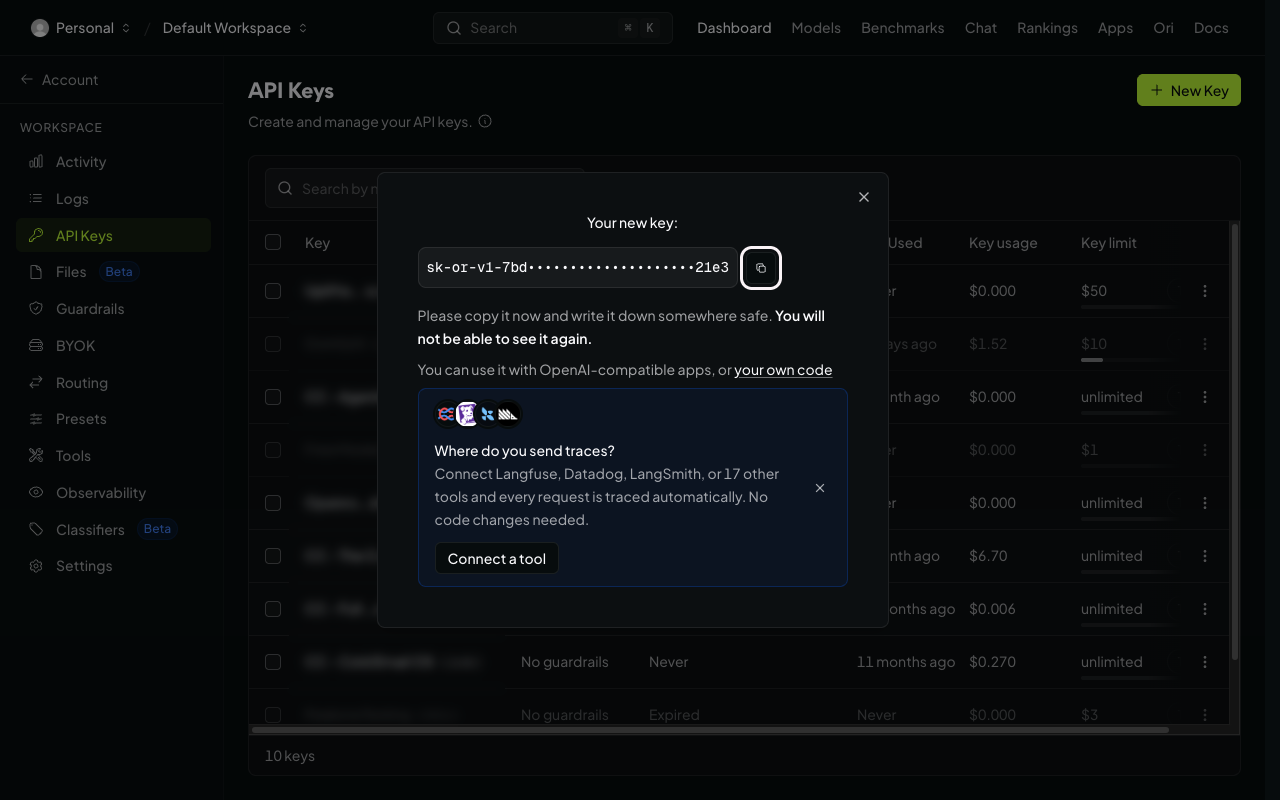
Under **Your new key**, click the copy icon next to the key. It starts with `sk-or-`.
> **Careful:**
> The key is only shown once. If you lose it, create a new one.
### Step 3: Copy the key
Under **Your new key**, click the copy icon next to the key. It starts with `sk-or-`.
> **Careful:**
> The key is only shown once. If you lose it, create a new one.
 ## Send it to us
- [Send it with OneTimeSecret](https://guide.upliftedconsulting.com/start-here/sending-securely.md): Paste the key into OneTimeSecret, create the link, and send us **only the link**. Label it "OpenRouter API key".
## Something not right?
### I made a Management key by mistake
Management keys (on the **Management keys** page) cannot run AI requests. Go to the normal API keys page at [openrouter.ai/settings/keys](https://openrouter.ai/settings/keys) and create the key there.
### We hit the limit. How do I raise it?
On the API keys page, open the key's menu and edit its credit limit. You don't need a new key.
### The key has a limit, but requests still fail
Your account may be out of credits. The key's limit is a cap, not money. Add credits on the [Credits page](https://openrouter.ai/settings/credits).
Last checked: 22 Oct 2026 against [OpenRouter's authentication docs](https://openrouter.ai/docs/api-reference/authentication).
---
Source: https://guide.upliftedconsulting.com/services/openrouter · Updated 2026-10-22
## Send it to us
- [Send it with OneTimeSecret](https://guide.upliftedconsulting.com/start-here/sending-securely.md): Paste the key into OneTimeSecret, create the link, and send us **only the link**. Label it "OpenRouter API key".
## Something not right?
### I made a Management key by mistake
Management keys (on the **Management keys** page) cannot run AI requests. Go to the normal API keys page at [openrouter.ai/settings/keys](https://openrouter.ai/settings/keys) and create the key there.
### We hit the limit. How do I raise it?
On the API keys page, open the key's menu and edit its credit limit. You don't need a new key.
### The key has a limit, but requests still fail
Your account may be out of credits. The key's limit is a cap, not money. Add credits on the [Credits page](https://openrouter.ai/settings/credits).
Last checked: 22 Oct 2026 against [OpenRouter's authentication docs](https://openrouter.ai/docs/api-reference/authentication).
---
Source: https://guide.upliftedconsulting.com/services/openrouter · Updated 2026-10-22